
Launch-ready mobile foundation with KindeAuth, RBAC, and offline-first defaults.
This documentation covers the Flutter mobile app, NestJS backend, environment setup, and release process so you can ship faster with confidence.
Quickstart
Get the backend and mobile app running locally in minutes.
Backend
Runs on NestJS with Kinde JWT authentication.
cd backend
cp .env.example .env
npm install
npm run start:dev
Mobile App
Flutter app with modern UI, RBAC gating, and offline caching.
cd mobile
cp .env.example assets/.env
flutter pub get
flutter run -d iosArchitecture overview
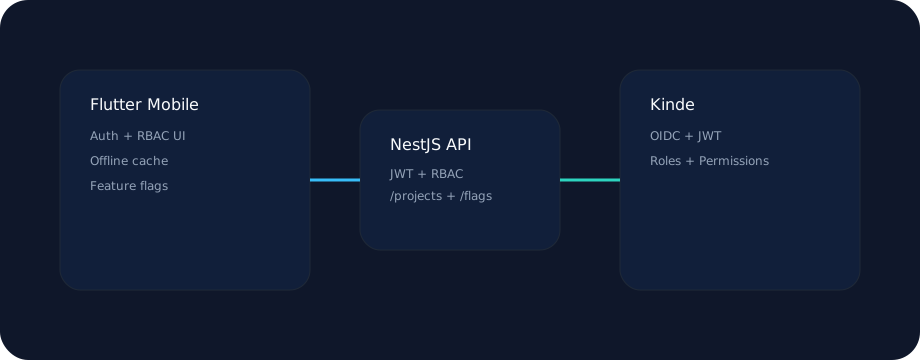
Frontend and backend are designed to scale independently with clear service boundaries.
Mobile App
Flutter 3 app with Riverpod state, GoRouter navigation, and FlexColorScheme theming.

Security
Tokens stored in secure storage, auto-refresh on expiry, and HTTPS enforced in release.

Offline-first
Dio cache interceptor + Hive storage keep the app functional without connectivity.

Custom theme
Change accent colors and theme mode from the Profile screen, persisted locally.
Key packages
- flutter_riverpod for state and dependency injection
- go_router for navigation + RBAC gating
- dio + dio_smart_retry for networking
- hive + hive_flutter for caching
- flutter_appauth for Kinde OIDC
- permission_handler for system permissions
App structure
mobile/lib/
  app.dart
  core/
    config/
    network/
    routing/
    services/
    storage/
    theme/
  features/
    auth/
    home/
    projects/
    profile/
  widgets/
App icons + splash
Assets live in mobile/assets/images.
dart run flutter_launcher_icons
dart run flutter_native_splash:create
Permissions
Configure permissions in:
- mobile/ios/Runner/Info.plist
- mobile/android/app/src/main/AndroidManifest.xml
Backend
NestJS API with JWT validation against Kinde and built-in RBAC guards.
Core modules
- AuthModule with JWT strategy + guards
- ProjectsModule for RBAC-gated resources
- FeatureFlagsModule for rollout control
- HealthModule for uptime checks
Endpoints
GET /health
GET /me
GET /flags
GET /projects
POST /projectsGuides
Operational guidance for auth, offline sync, and feature flags.
Kinde setup
- Create a Kinde app and enable PKCE.
- Add redirect URIs:
com.example.mobileapp://login-callback
com.example.mobileapp://logout-callback
Add API permissions: projects:read, projects:write.
Offline strategy
GET responses are cached in Hive. When offline, cached responses are served automatically.
- Cache TTL defaults to 15 minutes.
- Offline banner updates via connectivity stream.
Feature flags
Flags are served from /flags and cached locally.
- Client polls on an interval (configurable).
- Use flags for phased rollouts and kill switches.
Push notifications
Enable by setting ENABLE_PUSH=true and wiring Firebase/APNS.
- Push service is stubbed and ready for provider integration.
- Permissions flow uses permission_handler.
Deploy & Release
Release governance, rollback strategy, and deployment paths.
Versioning
Use SemVer with build numbers.
version: MAJOR.MINOR.PATCH+BUILDSee docs/VERSIONING.md for rules.
Release notes
Template located at docs/RELEASE_NOTES_TEMPLATE.md.
Track highlights, fixes, QA checks, and rollback plan.
Rollback strategy
- Kill switches via feature flags
- Phased rollout in stores
- Patch hotfixes when needed
Details in docs/ROLLBACK.md.
Docker
docker compose up --buildDeploy the backend anywhere with a single container.